I was learning frontend system design backwards
I started with load balancers, queues, and databases. Frontend system design made more sense when I began with problems I already saw in the browser.
- #frontend-system-design
- #system-design
- #frontend-architecture
- #state-management
- #api-design
- #caching
- #reliability
When I started learning system design, I thought I had to begin with load balancers, databases, queues, replicas, and partitions.
Most system design diagrams looked the same. There was a small client box on one side. It was usually called “web” or “mobile.” Then the rest of the diagram moved to the backend, where all the important-looking boxes were.
So I started there.
I was learning what each box did, but I still could not connect it to the frontend work I was doing. I would read about databases and replicas, then come back to a much simpler question: after a user updates something, which value should I show on the screen?
That is also a system design question.
The problem was the order in which I was learning. I was starting far away from the part of the system I already knew. Things became easier when I started with a normal frontend screen and followed its problems towards the backend.
Frontend system design is about how a frontend gets data, stores it, shows it, and handles things going wrong. It also includes how the browser talks to the API and what the backend needs to provide.
I started with the wrong questions
I used to begin with questions like these:
- What does a load balancer do?
- Why do we need a queue?
- When do we use a replica?
- How does database partitioning work?
These are useful things to learn. But I had no real problem to connect them to.
The questions I see in frontend work are more direct:
- Where should this data live?
- Should this value be in the URL?
- How old can this data be before I refresh it?
- What happens if two requests finish in the wrong order?
- What should the page show when one request fails?
- Can I safely send the same action again?
- What has to load before the user can use the page?
These questions may start in a component, but the answer often goes outside it. A pagination bug can come from the API. A slow screen can come from requests waiting for one another. A retry can create the same record twice if the backend does not know that it has already handled the request.
Once I started with these problems, the backend concepts had a reason to exist.
Start with a normal dashboard
Take a project dashboard. It has a table, search, filters, sorting, pagination, and a button for archiving a project.
At first, this looks like a component task. Build a filter bar, a table, pagination controls, and a dialog. Fetch the projects and render them.
Now think about the filters. Keeping them in component state is easy, but refreshing the page removes them. A teammate also cannot open the same filtered view from a link. If the filters are part of the URL, the page can be refreshed, shared, and opened again later.
Then there is the data itself. Downloading all projects makes frontend filtering easy. It also becomes slow when the list gets large. Asking the server for only the matching projects sends less data, but now the API needs to understand every filter shown on the screen.
Pagination has the same problem. Page two sounds simple until somebody adds a new project while the user is looking at page one. The records can move, and the next request may repeat or skip one. I wrote about this in why offset pagination can duplicate or skip records.
Now let the user archive a project. The screen can wait for the API before changing the row. It can also change the row immediately and undo the change if the API fails. This is called an optimistic update. It feels faster, but we have to decide what happens when the request fails or another user has already edited the same project.
The table can also become slow when it renders too many rows. Pagination, infinite scroll, and virtualization help in different ways. I covered those differences in handling a large dataset in the frontend.
This one dashboard already depends on the URL, browser state, data requests, API rules, and the database:
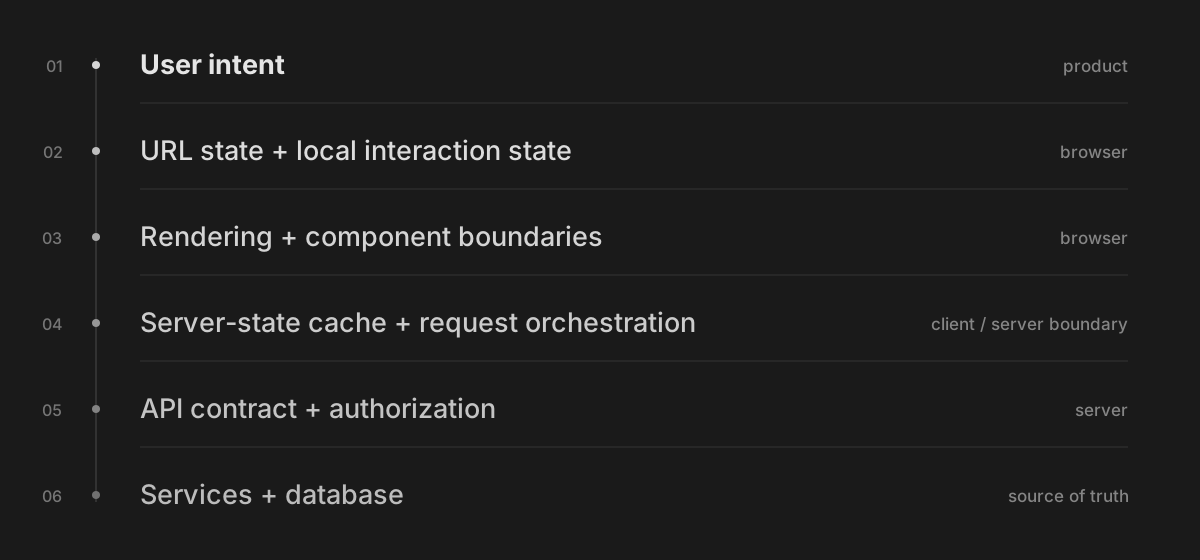
We do not need to make the dashboard more complicated. We only need to notice which decisions are already there.
The browser is part of the system
The browser does much more than show HTML. It stores data, caches files, runs JavaScript, keeps navigation history, and talks to the network. Any of these things can affect what the user sees.
Before a page becomes useful, the browser may need HTML, CSS, JavaScript, session data, and API responses. Some of them can load together. Some have to wait for something else.
This is why rendering is also a system design decision. Server rendering can send useful HTML early. Client rendering may wait for JavaScript and data before it can show the main content. Streaming can send one part of the page while another part is still loading.
The question I find useful is simple:
What does the user need before they can do the next thing?
Caching also happens in more than one place:
| Cache | Where the copy lives | Question to ask |
|---|---|---|
| CDN cache | Near the user | Can the same response be reused for different users? |
| Browser HTTP cache | User's browser | How long can it be reused before checking with the server? |
| Server cache | Application server | When should the server rebuild or refresh it? |
| Frontend data cache | Browser memory | Can the page show old data while it loads the latest data? |
| Saved data for offline use | User's device | What should remain after a refresh or lost connection? |
A response may be stored at the CDN, in the browser's HTTP cache, on the server, or inside a frontend data library. A service worker can store another copy for offline use.
Every copy can become old. So whenever I think about adding a cache, I also need to ask:
- How old is this copy allowed to be?
- Who refreshes it?
- What should the page show while it is being refreshed?
There is one more browser problem that is easy to forget. A user can leave a tab open while we deploy a new backend version. They may also open an older JavaScript file from the browser cache. The server and every open tab do not update at the same time, so API changes need to keep older clients in mind.
The API decides what the frontend can do
The frontend cannot fix every problem after the API response arrives.
Suppose the dashboard needs the workspace, permissions, filter options, counts, and rows. If each request has to wait for the previous request, the page loads in steps. This is a request waterfall. Changing the loading spinner will not remove those waits.
The response itself matters too. Without a stable ID, the frontend has trouble knowing whether two records are the same. If an update returns only { success: true }, the frontend has to guess the new value or fetch the record again. If every error has the same shape, the screen cannot tell the difference between invalid input, missing permission, and a server failure.
Many frontend questions have an API question behind them:
| Frontend question | What we also need to ask |
|---|---|
| Which loading UI should I show? | Which data does the useful part of the page need? |
| Should I put this in a global store? | Where does the real value live? |
| Should I retry this request? | Can this create the same record twice? |
| Should I update the screen immediately? | How do I undo it when the server rejects the change? |
| Should I add infinite scroll? | How does the API tell me where the next page starts? |
| Can I trust this TypeScript type? | Did we check the data that came back from the API at runtime? |
TypeScript does not check a network response just because we wrote an interface for it. We still need to check the data when it enters the application. I explained this in TypeScript didn't make your code safer.
Frontend engineers may not build every backend service. But we use the API every day, so we should be part of deciding how that API works.
First ask where the state belongs
State management often becomes a discussion about Context, Redux, Zustand, or another library.
Before choosing a library, I find it easier to separate the state by what it is used for:
- Local state: an open menu, text being typed, or a selected row.
- URL state: search, filters, sorting, tabs, and pagination.
- Server data: data fetched from an API. The latest value still lives on the server.
- Saved browser data: drafts or preferences that should remain after a refresh.
- Shared data: data that other users can change at the same time.
These values may all look like JavaScript objects, but they do not behave in the same way.
A filter that should survive a refresh probably belongs in the URL. Project data from an API is a local copy of server data. A draft that must work offline needs to be stored outside component memory. I wrote more about this in why your useState is in the wrong place.
A state library helps us store and share values. We still have to decide where the real value lives and what happens when two copies are different.
Backend failures become frontend problems
A timeout becomes a button that looks stuck. Old data becomes a profile photo that changes back after an update. A partial failure becomes a dashboard where the table loads but the count does not.
Here are four small examples:
- A user types quickly in a search box. Request
Astarts first. RequestBstarts second. IfAfinishes last, the page may show the older result. We need to cancel it or ignore it. - A user double-clicks “Create.” Disabling the button helps, but the browser may still send the request again after losing the first response. The server needs a way to know that it already created the record.
- The frontend updates a row before the API finishes, but the API rejects the change. The page needs the old value so it can undo the update.
- A WebSocket disconnects and connects again. The connection is back, but the browser may have missed messages while it was offline. It needs to fetch what it missed or load the latest data again.
These problems can happen in a small application. We only need two requests for the first bug and one bad network connection for the last one.
More users make these problems happen more often. They do not create the problems.
How I would learn frontend system design now
I would pick one screen I already understand and move outwards from it:
| Step | How I started learning | How I would learn now |
|---|---|---|
| 1 | Distributed system basics | What the user sees and does |
| 2 | Infrastructure | Browser and HTTP |
| 3 | Databases and replicas | State and where it belongs |
| 4 | Queues and partitions | API requests and responses |
| 5 | APIs | Caching and rendering |
| 6 | Browser | Failures and keeping data in sync |
| 7 | What happens in the UI | Distributed system basics |
For example, take a dashboard, feed, editor, search page, or checkout page. Then ask:
- What state does this page have, and where should each value live?
- Where does the data come from, and which requests wait for another request?
- Where are copies of the data stored, and when do they become old?
- What needs to load before the user can use the page?
- What happens when a request is slow, fails, finishes late, or runs twice?
- Which problems need a change in the API or backend?
This is where backend system design started to click for me.
A queue explains why an action can stay in a “processing” state. A database replica explains why an old value can appear after an update. A cache key explains why two users may receive different versions of the same response. A stable request ID explains how the server can avoid doing the same work twice.
The boxes are easier to understand after I know which frontend problem they solve.
I now follow the problem
Earlier, I started with “What does a load balancer do?”
Now I start with “What can go wrong after the user clicks this button?”
Following that question still takes me to APIs, caches, queues, replicas, and databases. The difference is that I understand why I reached them.
That learning order works better for me because it starts with something I already know: the frontend.